


Simplified corporate transport: full control & real-time visibility
Optimise corporate mobility with BatOnRoute. Safe and fully tailored transport routes for your company.
Our employee transport system gives you instant insights into delays, service usage and incidents, allowing you to make fast, informed decisions with ease.
The features your company needs to optimise employee transport
Streamline and simplify your transport management
With BatOnRoute, you can efficiently manage your employee transport with full visibility over routes, timetables and incidents, all from a single platform.
- Track individual route and stop usage by each employee.
- Make adjustments to planning and manage absences.
- Monitor journey duration and vehicle speed.
- Receive real-time notifications of bus location or delays.
- Get instant alerts for incidents.
- Compatible with your current transport provider, no need to switch.

Improve punctuality & optimise employee transport
Ensure reliable, efficient and on-time employee transport. Our platform helps you avoid traffic, guarantee timely arrivals and maintain full control.
- Guaranteed punctuality: Reduce delays and ensure employees arrive on time.
- Real-time reports: Constantly monitor service usage and performance.
- Route optimisation: Continuously improve routes to increase efficiency and cut costs.
Sustainable transport for a better future
Revolutionise your daily operations with BatOnRoute and embrace digital transformation. Go paperless and promote sustainability.
- Encourage shared transport and reduce the number of vehicles on the road.
- Help cut CO₂ emissions and improve air quality.
- Less congestion, greater efficiency: optimise peak-time traffic flow.
- Eliminate paper use with smarter, more sustainable processes.
A complete solution for every challenge
Employee transport
Efficient and safe staff transport, ensuring punctuality and cost optimisation.
- Routes designed to minimise travel time and expense.
- Real-time tracking for enhanced security and control.
- Automated attendance and usage records.
- Ensure employee presence and punctuality.

Attendance control
We automate and simplify attendance recording, reducing errors and optimising resource management.
- Register bus entry and exit using QR codes, NFC, or geolocation. Ask us! We can provide all the necessary technology.
- Integration with internal HR systems via API.
- Access to usage reports and statistics for control and auditing.
- Real-time alerts for absences or incidents.
Route optimisation
We provide access to advanced tools for planning and optimising routes, ensuring more efficient and cost-effective mobility.
- Intelligent algorithms for planning optimal routes.
- Dynamic adaptation to changes in demand and traffic.
- Reduced travel time and fuel consumption.
- Data analysis for continuous improvement and cost reduction.
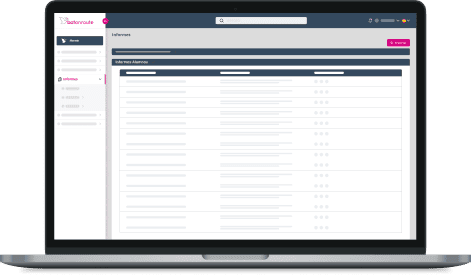
Everyone wins: companies, employees, and operators
BatOnRoute is more than just a transport system: it’s a tool designed to enhance the experience of everyone involved. With advanced technology and unique features, everyone benefits.
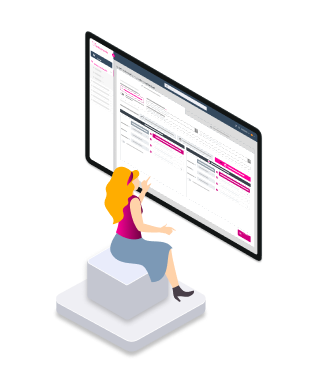
Benefits for the company
Efficiency and control
Manage your transport service with precision and optimise your organisation’s resources. BatOnRoute gives you full access to the information and tools needed to ensure attendance, prevent incidents, and operate more efficiently.
- Total service control: Manage timetables, routes, and stops from one place.
- Incident prevention: Minimise individual issues with detailed information access.
- Real-time information: Instantly monitor routes to make quick decisions.
- Operational optimisation: Improve efficiency and reduce associated transport costs.
Integrate BatOnRoute into your organisation without changing your current transport provider or installing any additional equipment.
Benefits for employees
Convenience, punctuality, and savings
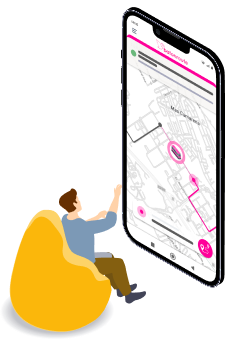
Offer your employees a solution that removes the stress of daily commuting. With BatOnRoute, they enjoy a punctual, flexible, and sustainable service while saving time and money.
- Real-time tracking: Bus location, incidents, and flexible route and absence adjustments.
- Guaranteed punctuality: Getting to work on time has never been easier.
- Cost savings: Eliminate the need for personal vehicles, reducing fuel and maintenance expenses.
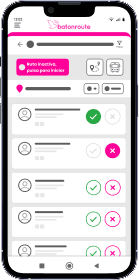
- Simplified management: Employees can book their seat and manage absences easily via the app.
- Greater peace of mind: Real-time information on bus status and stop proximity.
- Environmentally friendly: Participate in a shared and sustainable transport model.
Benefits for drivers
Simplified, hassle-free management
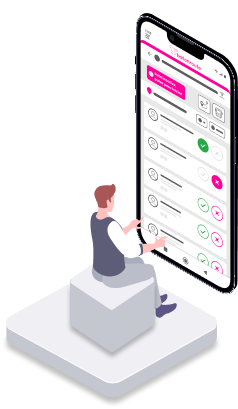
With BatOnRoute, transport companies can offer an efficient and professional service with no additional installations required:
- Route and stop records: Full transparency on the service provided.
- Quick passenger identification: QR Identify users quickly using QR codes.
- No hardware installation: No need to add GPS or other devices to the vehicles.
- Minimal app usage: Drivers have just what they need to operate safely and without distractions, ensuring compliance with traffic laws.
- Easy and safe management: Tech tools that keep everything running smoothly and reliably.
All-in-one: integrate BatOnRoute with your tools
At BatOnRoute, we understand every company has unique needs for optimising their processes. That’s why we offer a flexible, easy-to-integrate solution. Discover how our integrations can boost your company’s productivity:
- Proprietary API: Connect your applications to the BatOnRoute API to automate workflows.
- Simplified user authentication with Microsoft 365.
- We work with you to develop tailored integrations that meet your specific needs.
Do you have specific requirements? Get in touch!
We resolve your queries
All you need to know about BatOnRoute
Do I need to have GPS in vehicles to use BatOnRoute?
No, it is not necessary to install GPS in vehicles. BatOnRoute works without the need for additional equipment or facilities. Our solution uses the driver’s or route manager’s mobile phone to track them, saving costs and simplifying management.
Does the driver need to manually manipulate the mobile device while on the road?
No, the driver does not have to manipulate the mobile device while the route is underway. BatOnRoute features automatic stop dispatch. This functionality means that stops en route are automatically recorded when the bus leaves its radius. These spokes are defined when preparing the BatOnRoute environment.
In addition, the Control app has a functionality that allows QR codes or NFC cards to be read for passenger control. In this way, each employee can scan their QR or swipe their NFC card so that it is registered as uploaded en route. Both options are configurable from the BatOnRoute admin panel.
In case I want to read QR/NFC card, do I need to install something additional or can I do it from the app?
From BatOnRoute Control it is possible to access the camera of the mobile device for QR reading. The NFC reader can also be used as long as the mobile device has it integrated.
Certain devices with low RAM may not read QR codes quickly. The Control app is compatible with different QR readers. These can be connected to the mobile device and record the codes in the app when the employees swipe them. Check with the company for compatible reader models.
Can I track all routes in real time?
Yes, BatOnRoute has an administration panel from which you can track all the routes in real time. On the platform, a map will appear on which you can see the current position of each active route.
In addition, you can access a section to see in detail the route traveled by a specific route. Either to see the route live or to see a history of the route he made.
Can I get a report with all the routes and their durations?
Yes, BatOnRoute has a wide variety of reports. Among them, there is a report that shows the start and end time of the route, as well as its total duration. Reports are also available in which you can obtain the actual times of passage for each of the stops en route.
All reports can be pre-configured by applying a series of filters. In addition, they can be downloaded in both PDF and XLSX to work with.
Can I know who uses the transport and who doesn't?
BatOnRoute has an admin panel from which you can get a wide range of reports. Among these are reports that show the statuses of employees who make use of the routes. Thus being able to see if a certain employee really uses the route or not. Time periods are customizable. You can obtain any set of historical data.
All reports can be downloaded in PDF or XLSX format so that you can work with them in a spreadsheet.
How can I prevent employees who have not contracted transport from using it?
In order for an employee to appear on the route or be able to use it through reservations, they must have previously registered in the system. In this way, only those users who have registered previously will appear in the route. Thus preventing someone not registered from being assigned to the route.
In addition, BatOnRoute has several methods to record the employees who make use of the routes. Among these methods, there is the reading of QR codes or NFC cards. When a new employee is registered in the system, a QR code/NFC card can be generated for them. When he is going to use the route, he will have to pass his QR code/NFC card in the app that he will use in the driver of the route. If you are registered in the system, the app will recognize you and mark you as having used the route. If it is not, an error message will appear so the driver will know that the passenger is not in the system.
Does it integrate with my HR or clocking system?
Contact us at info@batonroute.com and tell us what HR system or clocking system you use. We will be happy to study the best way to integrate and help you optimize your management.
To find out if we need to hire new routes, can I know the real occupancy of each of the routes?
Yes, other reports that BatOnRoute has are aimed at managing spaces en route. Specifically, there is the “Places by date” report. Which shows the number of seats reserved en route vs. the number of seats that have actually been occupied on each of the routes.
Like all reports, it can be customized, in this case filtered by date/path, and downloaded in PDF/XLSX.
Can I manage different locations and services?
Yes, in BatOnRoute you can have a user with a Group administrator profile. In this way, it will be possible to manage all the companies associated with the group without having to log out to change users.
Among the actions that the administrator can do is the management of services and passengers who make use of the transport. In addition to the option to obtain all kinds of reports related to the routes that are carried out.
What advantages does BatOnRoute have in relation to the environment?
Thanks to BatOnRoute you can save the number of buses you need to hire for your routes. BatOnRoute offers a seat registration system that allows you to know at all times the number of employees who use each of the planned routes. In this way, the number of vehicles used can be optimised and the pollution they emit can be reduced.
In addition, BatOnRoute has tools to calculate the carbon footprint in order to know the savings of hiring buses instead of each employee using their own transport.
I'm a new employee, what do I need to do to use the app?
Contact your company to be registered with BatOnRoute. Once registered, you will receive an email with your username and password. To access, you must download the BatOnRoute Moving app and log in with these credentials. The app is available for free download on the Play Store (Android) and App Store (iOS).
Can I track my route in real time?
Yes, by accessing the BatOnRoute Moving app, you will be able to follow the bus on your route in real time. Thus, being able to see at all times where the bus is.
While the route is running, you will also be able to see the various planned route stops and an actual estimate of the passage time. This way you will be able to know at what estimated time the bus will pass through your stop.
Can I manage my seat reservations from the app?
Yes, as long as the company allows it, occasional trips can be created from the BatOnRoute Moving app. These are temporary in nature and are used to change from one route to another. They can also be created to change stops within the same route.
Thanks to occasional trips, it is possible to modify the route planning that the company has assigned to you. In this way you can book a place on a route that you will use sporadically.
If there are no seats available on the route, the app will not let you create the occasional trip. Before you create your trip, you’ll be able to see if there are seats available on each of the routes.
Can I create incidents and make the company aware of them?
Yes, within the BatOnRoute Moving app, there is a section to create incidents. Here you can create as many issues as you see fit. These will be registered for the company to manage from its administration panel.
I won't be using transport for a few days in particular, can I create absences from the app?
Yes, as long as the company allows it. In the BatOnRoute Moving app, you can create absences for your planned routes. By creating the absence, you will justify that you are not going to use the route. In this way, the company will be able to know when it is not going to use it and why. The absences that are created are of a temporary nature. In other words, they will only take effect on the days indicated when they were created.
What if I have a rotating shift? Does the system take this into account?
From the BatOnRoute Moving app, you can manage your route planning. From creating Absences in case of not using the route, to creating occasional trips. With Occasional Trips, we can change to another route. These changes can be for a day, week, or months. BatOnRoute will always check if the route has places available for the dates indicated. If they do not have them, the user will not be able to make the change.
What personal data is collected and who sees it?
The user will only need the email to be able to access. This email will have to be provided to the company so that the user can be believed. Once created, the employee will receive the access credentials in their email.
Within the app, the user will only be able to view the route and stops of the route assigned to them for the day. You can use occasional trips to change your route if you need to.
Do I need to have GPS in vehicles to use BatOnRoute?
No, it is not necessary to install GPS in vehicles. BatOnRoute works without the need for additional equipment or facilities. Our solution uses the driver’s or route manager’s mobile phone to track them, saving costs and simplifying management.
Does the driver need to manually manipulate the mobile device while on the road?
No, the driver does not have to manipulate the mobile device while the route is underway. BatOnRoute features automatic stop dispatch. This functionality means that stops en route are automatically recorded when the bus leaves its radius. These spokes are defined when preparing the BatOnRoute environment.
In addition, the Control app has a functionality that allows QR codes or NFC cards to be read for passenger control. In this way, each employee can scan their QR or swipe their NFC card so that it is registered as uploaded en route. Both options are configurable from the BatOnRoute admin panel.
In case I want to read QR/NFC card, do I need to install something additional or can I do it from the app?
From BatOnRoute Control it is possible to access the camera of the mobile device for QR reading. The NFC reader can also be used as long as the mobile device has it integrated.
Certain devices with low RAM may not read QR codes quickly. The Control app is compatible with different QR readers. These can be connected to the mobile device and record the codes in the app when the employees swipe them. Check with the company for compatible reader models.
Can I track all routes in real time?
Yes, BatOnRoute has an administration panel from which you can track all the routes in real time. On the platform, a map will appear on which you can see the current position of each active route.
In addition, you can access a section to see in detail the route traveled by a specific route. Either to see the route live or to see a history of the route he made.
Can I get a report with all the routes and their durations?
Yes, BatOnRoute has a wide variety of reports. Among them, there is a report that shows the start and end time of the route, as well as its total duration. Reports are also available in which you can obtain the actual times of passage for each of the stops en route.
All reports can be pre-configured by applying a series of filters. In addition, they can be downloaded in both PDF and XLSX to work with.
Can I know who uses the transport and who doesn't?
BatOnRoute has an admin panel from which you can get a wide range of reports. Among these are reports that show the statuses of employees who make use of the routes. Thus being able to see if a certain employee really uses the route or not. Time periods are customizable. You can obtain any set of historical data.
All reports can be downloaded in PDF or XLSX format so that you can work with them in a spreadsheet.
How can I prevent employees who have not contracted transport from using it?
In order for an employee to appear on the route or be able to use it through reservations, they must have previously registered in the system. In this way, only those users who have registered previously will appear in the route. Thus preventing someone not registered from being assigned to the route.
In addition, BatOnRoute has several methods to record the employees who make use of the routes. Among these methods, there is the reading of QR codes or NFC cards. When a new employee is registered in the system, a QR code/NFC card can be generated for them. When he is going to use the route, he will have to pass his QR code/NFC card in the app that he will use in the driver of the route. If you are registered in the system, the app will recognize you and mark you as having used the route. If it is not, an error message will appear so the driver will know that the passenger is not in the system.
Does it integrate with my HR or clocking system?
Contact us at info@batonroute.com and tell us what HR system or clocking system you use. We will be happy to study the best way to integrate and help you optimize your management.
To find out if we need to hire new routes, can I know the real occupancy of each of the routes?
Yes, other reports that BatOnRoute has are aimed at managing spaces en route. Specifically, there is the “Places by date” report. Which shows the number of seats reserved en route vs. the number of seats that have actually been occupied on each of the routes.
Like all reports, it can be customized, in this case filtered by date/path, and downloaded in PDF/XLSX.
Can I manage different locations and services?
Yes, in BatOnRoute you can have a user with a Group administrator profile. In this way, it will be possible to manage all the companies associated with the group without having to log out to change users.
Among the actions that the administrator can do is the management of services and passengers who make use of the transport. In addition to the option to obtain all kinds of reports related to the routes that are carried out.
What advantages does BatOnRoute have in relation to the environment?
Thanks to BatOnRoute you can save the number of buses you need to hire for your routes. BatOnRoute offers a seat registration system that allows you to know at all times the number of employees who use each of the planned routes. In this way, the number of vehicles used can be optimised and the pollution they emit can be reduced.
In addition, BatOnRoute has tools to calculate the carbon footprint in order to know the savings of hiring buses instead of each employee using their own transport.
I'm a new employee, what do I need to do to use the app?
Contact your company to be registered with BatOnRoute. Once registered, you will receive an email with your username and password. To access, you must download the BatOnRoute Moving app and log in with these credentials. The app is available for free download on the Play Store (Android) and App Store (iOS).
Can I track my route in real time?
Yes, by accessing the BatOnRoute Moving app, you will be able to follow the bus on your route in real time. Thus, being able to see at all times where the bus is.
While the route is running, you will also be able to see the various planned route stops and an actual estimate of the passage time. This way you will be able to know at what estimated time the bus will pass through your stop.
Can I manage my seat reservations from the app?
Yes, as long as the company allows it, occasional trips can be created from the BatOnRoute Moving app. These are temporary in nature and are used to change from one route to another. They can also be created to change stops within the same route.
Thanks to occasional trips, it is possible to modify the route planning that the company has assigned to you. In this way you can book a place on a route that you will use sporadically.
If there are no seats available on the route, the app will not let you create the occasional trip. Before you create your trip, you’ll be able to see if there are seats available on each of the routes.
Can I create incidents and make the company aware of them?
Yes, within the BatOnRoute Moving app, there is a section to create incidents. Here you can create as many issues as you see fit. These will be registered for the company to manage from its administration panel.
I won't be using transport for a few days in particular, can I create absences from the app?
Yes, as long as the company allows it. In the BatOnRoute Moving app, you can create absences for your planned routes. By creating the absence, you will justify that you are not going to use the route. In this way, the company will be able to know when it is not going to use it and why. The absences that are created are of a temporary nature. In other words, they will only take effect on the days indicated when they were created.
What if I have a rotating shift? Does the system take this into account?
From the BatOnRoute Moving app, you can manage your route planning. From creating Absences in case of not using the route, to creating occasional trips. With Occasional Trips, we can change to another route. These changes can be for a day, week, or months. BatOnRoute will always check if the route has places available for the dates indicated. If they do not have them, the user will not be able to make the change.
What personal data is collected and who sees it?
The user will only need the email to be able to access. This email will have to be provided to the company so that the user can be believed. Once created, the employee will receive the access credentials in their email.
Within the app, the user will only be able to view the route and stops of the route assigned to them for the day. You can use occasional trips to change your route if you need to.
Our priority is to increase safety and help you manage routes and users with Bus Tracker
Request information and discover how BatOnRoute optimizes your route management.
We are here for you!



We need to know a little about you in order to contact you