


A school transport software designed for chaperone companies
More control, more safety on every school journey
Digitise your chaperone company’s operations and ensure safe monitoring of every student, with full traceability and real-time communication.
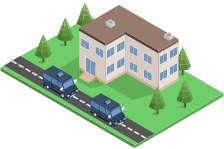
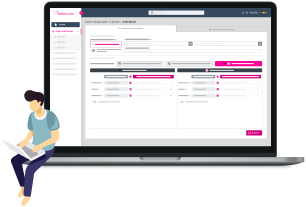
School journeys with no control or safety
Manually managing school transport leads to errors, data loss, and poor communication with families and schools, making pupil tracking and safety difficult.
Everything you can do with our school transport software
Our solution lets you easily manage every aspect of the service from any device. These are the main features:
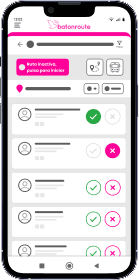
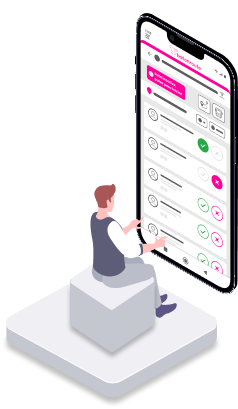
- Digital check-in and check-out: Chaperones can register students getting on or off at each stop with a single tap, including timestamp and automatic geolocation.
- Automatic notifications to families: Every time a child boards, alights or an incident is logged, parents receive an alert directly to their mobile. No phone calls needed.
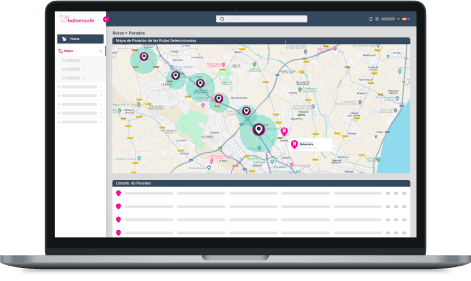
- Assign chaperones to routes: Easily manage which chaperone is assigned to which route, on which days, and with which group of students.
- Live pupil lists per route: Instantly view which pupils are linked to each route, with relevant data for tracking.
- Incident log on the go: Chaperones can record any delays, absences or special situations during the journey.
- Full service history: Access complete records by pupil, route or chaperone. Everything is logged for audits, reviews or internal analysis.
- Authorized Student Drop-off Control: With BatOnRoute, you ensure each student is handed over only to the people authorized by parents or guardians via the app.
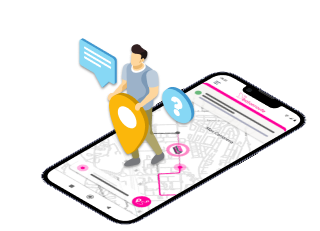
One school software, multiple solutions for your routes
From traditional school buses to walking buses and adapted transport services, BatOnRoute offers a flexible school software tailored to the real needs of chaperone companies. Digitise your management, strengthen student safety, and improve coordination with schools and families, effortlessly.
School Transport
BatOnRoute offers an intuitive solution for school chaperones, prioritising student safety and giving families peace of mind as their children travel by bus.
- Simple route management, assigning stops to each pupil.
- Route changes and absence marking.
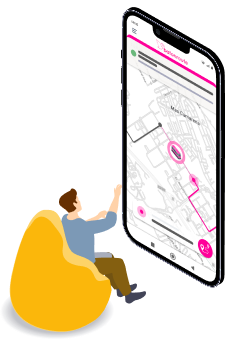
- Real-time tracking of the school bus location.
- Automatic notifications to parents about delays on each route.
- Timestamp and delay tracking for each bus stop.

Adapted Transport
Manage adapted transport with a mix of smart technology and personalised care, ensuring a safe, efficient and human experience for each user and their family.
- Custom route settings per user, including stops, schedules, frequency and special needs.
- Individual attendance tracking: Each boarding and drop-off logged per user.
- Real-time tracking via the school transport app.
- Automatic notifications to families, schools or carers about pick-ups, drop-offs or incidents.
- Complete historical log for compliance and service improvement.
Walking Bus
The Walking Bus is a safe and healthy option for the school run, where children walk under the supervision of an adult. BatOnRoute ensures their safety, encourages healthy habits, and helps reduce traffic near the school.
- Chaperone location on the map: Schools can view the chaperone’s real-time location, ensuring a safe journey.
- Pick-up/drop-off alerts: Notifications are sent when pupils are picked up or dropped off, maintaining proper control.
- Incident and delay alerts: The system informs families of any delays or issues, improving communication and coordination.
Benefits for everyone involved in school transport services
Using a school transport app not only streamlines operations for chaperone companies, it also provides real, tangible benefits to all parties: pupils, schools, chaperones and families. Discover how each group benefits from a digital solution that boosts school safety, coordination and real-time communication.
Benefits for students
- Greater safety on every journey: Every boarding and drop-off is recorded and monitored.
- Better-organised accompaniment: Chaperones have the info they need to act quickly and accurately.
- Fewer delays, confusions or mistakes at stops.
Benefits for schools
- Real-time visibility of the service: Schools have access to live updates on the status of all school transport routes. They can see who has arrived, if there are any incidents, or if delays are affecting the service.
- Improved coordination with families and transport companies: Digitising route management ensures all information flows smoothly between chaperones, schools and families.
- Complete history of attendance and routes: BatOnRoute’s school software allows schools to review attendance records, stops and incidents, aiding organisation and future queries.
Benefits for chaperones companies
- A user-friendly school transport app: Chaperones can manage all their routes straight from their phone with a simple, intuitive app. Logging pick-ups, drop-offs and incidents is quick and efficient, allowing them to focus on student safety.
- Less stress and paperwork: No more paper forms or manual time tracking, everything is recorded automatically.
- Tools that enhance safety: With full traceability of each journey and real-time alerts, chaperones gain greater control over pupil safety.
Benefits for families
- Peace of mind guaranteed: Automatic notifications keep families instantly informed when their child gets on or off the bus, improving safety and reducing anxiety.
- Confidence in a secure system: Full journey traceability and supervision help build trust in the service. Parents know their child is in safe hands and routes are being thoroughly monitored.
- Immediate communication for any changes or incidents: Parents are alerted right away in case of delays, route changes or other issues, keeping them informed at all times.
Integrations
We create connections with the most innovative partners so that you and your loved ones are in good hands on every journey.





Frequently Asked Questions about our school software
Everything you need to know about BatOnRoute
Can I communicate with the monitor?
BatOnRoute does not allow direct communication between families and route monitors. However, families can create Absences and Occasional Trips from their app whenever permitted. They have a comments field to provide more details about the changes. Both will be reflected in the monitors’ app once created.
Guardians can always create Absences and Occasional Trips from the administration panel. Additionally, they can send personalized notifications to both route monitors and families.
Will I receive attendance reports?
Families can check attendance through notifications. Each time the transport is used, they will receive a notification indicating that the child has boarded the bus.
Guardians have access to various reports in their administration panel, including attendance reports for the routes.
How does BatOnRoute ensure the security of user data?
Batonroute is hosted in the Microsoft Azure cloud. Microsoft employs a variety of security measures to protect against external threats.
Azure protects data, both at rest and in transit, with next-generation encryption. Azure uses various encryption methods, protocols, and algorithms, including double encryption, to protect your data.
For data at rest, all data written to the Azure Storage platform is subjected to AES 256-bit encryption, in accordance with FIPS 140-2. Proper key management is essential. By default, your data is protected with Microsoft-managed keys, and Azure Key Vault helps ensure that your encryption keys are well protected. Azure key management also includes server-side encryption that uses service-managed keys, customer-managed keys in Azure Key Vault, or customer-managed keys on customer-controlled hardware. With client-side encryption, you can manage and store keys on-premises or in another secure location.
For data in transit, i.e., data moving between user devices and Microsoft datacenters, or within or between the datacenters themselves, Microsoft adheres to IEEE 802.1AE MAC security standards and uses and enables you to use industry-standard encrypted transport protocols, such as TLS (Transport Layer Security) and IPsec (Internet Security Protocol).
What is the process for setting up BatOnRoute?
Contact us via email soporte.batonroute@nunsys.com and we will help you get BatOnRoute up and running by performing a series of steps.
First, we’ll set up a custom instance with your route data. After this, we send you the access credentials and specify two trainings. A training course is oriented on the web administration platform. While the other focuses on the operation of the Batonroute Control app. After this, you will be ready to start using BatOnRoute.
What kind of technical support does BatOnRoute offer?
Batonroute has a support team that offers 24×7 technical assistance. From helping with the implementation to resolving doubts and incidents during the use of the product. Such assistance is included in the monthly product fee.
What languages is it available in?
The Batonroute administration platform is available in the following languages:
Spanish, Catalan, English, Basque, Italian, French, Polish, German, Greek, Portuguese, Romanian and Arabic.
Do I have to manually mark each child when they get on and off?
No, BatOnRoute tracks travelers via QR codes or NFC cards. Students can scan their QR code or NFC card on the monitor’s device, automatically marking them in the BatOnRoute app.
Additionally, the app provides shortcuts for manual marking. For example, if a stop is recorded without marking any students, all will be marked as boarding the bus. Conversely, if only some are marked as boarding, the rest will automatically be marked as not boarding (and vice versa).
What if a child does not appear at their stop?
The monitor can add students not originally on the route. Whenever permitted, monitors can add any student registered in BatOnRoute to any stop on the route. These additions are temporary and treated as occasional trips.
Can I see my route for the day before starting?
Yes, monitors can view all their assigned routes for the day without activating them. This allows them to check today’s itinerary and any modifications. They can only view routes scheduled for the current day.
How does BatOnRoute improve coordination between the company and monitors?
Thanks to the notification system, the company can send personalized messages to monitors, which they receive on their mobile devices.
Monitors can record incidents that occur during their route. All incidents are logged in the administration panel for the company to manage.
In addition, BatOnRoute includes a Notes system, allowing the company and monitors to exchange comments about students on the route.
¿Cómo garantiza BatOnRoute la seguridad de los datos de los usuarios?
Lorem ipsum dolor sit amet, consectetur adipiscing elit. Maecenas in diam ut sapien volutpat consectetur. Duis maximus pulvinar odio, nec tincidunt enim dictum ac. Morbi condimentum interdum blandit. Maecenas interdum viverra tempor. Aliquam erat volutpat. Etiam finibus arcu convallis libero dapibus, eu maximus ex eleifend. Nunc pellentesque felis non ligula dictum, eu consequat mauris sodales. Aliquam non mollis dolor. Mauris vitae ipsum at lectus laoreet viverra sit amet sed dolor. Sed aliquam urna vel suscipit convallis. Proin nunc arcu, auctor vitae ipsum sit amet, consectetur semper nunc. Vivamus malesuada est eu nunc elementum iaculis.
¿Cuál es el proceso para configurar BatOnRoute?
Lorem ipsum dolor sit amet, consectetur adipiscing elit. Maecenas in diam ut sapien volutpat consectetur. Duis maximus pulvinar odio, nec tincidunt enim dictum ac. Morbi condimentum interdum blandit. Maecenas interdum viverra tempor. Aliquam erat volutpat. Etiam finibus arcu convallis libero dapibus, eu maximus ex eleifend. Nunc pellentesque felis non ligula dictum, eu consequat mauris sodales. Aliquam non mollis dolor. Mauris vitae ipsum at lectus laoreet viverra sit amet sed dolor. Sed aliquam urna vel suscipit convallis. Proin nunc arcu, auctor vitae ipsum sit amet, consectetur semper nunc. Vivamus malesuada est eu nunc elementum iaculis.
¿Qué tipo de soporte técnico ofrece BatOnRoute?
Lorem ipsum dolor sit amet, consectetur adipiscing elit. Maecenas in diam ut sapien volutpat consectetur. Duis maximus pulvinar odio, nec tincidunt enim dictum ac. Morbi condimentum interdum blandit. Maecenas interdum viverra tempor. Aliquam erat volutpat. Etiam finibus arcu convallis libero dapibus, eu maximus ex eleifend. Nunc pellentesque felis non ligula dictum, eu consequat mauris sodales. Aliquam non mollis dolor. Mauris vitae ipsum at lectus laoreet viverra sit amet sed dolor. Sed aliquam urna vel suscipit convallis. Proin nunc arcu, auctor vitae ipsum sit amet, consectetur semper nunc. Vivamus malesuada est eu nunc elementum iaculis.
¿En qué idiomas está disponible?
Lorem ipsum dolor sit amet, consectetur adipiscing elit. Maecenas in diam ut sapien volutpat consectetur. Duis maximus pulvinar odio, nec tincidunt enim dictum ac. Morbi condimentum interdum blandit. Maecenas interdum viverra tempor. Aliquam erat volutpat. Etiam finibus arcu convallis libero dapibus, eu maximus ex eleifend. Nunc pellentesque felis non ligula dictum, eu consequat mauris sodales. Aliquam non mollis dolor. Mauris vitae ipsum at lectus laoreet viverra sit amet sed dolor. Sed aliquam urna vel suscipit convallis. Proin nunc arcu, auctor vitae ipsum sit amet, consectetur semper nunc. Vivamus malesuada est eu nunc elementum iaculis.
How does BatOnRoute improve coordination between the company and monitors?
Thanks to the notification system, the company can send personalized messages to monitors, which they receive on their mobile devices.
Monitors can record incidents that occur during their route. All incidents are logged in the administration panel for the company to manage.
In addition, BatOnRoute includes a Notes system, allowing the company and monitors to exchange comments about students on the route.
How does BatOnRoute ensure the security of user data?
Batonroute is hosted in the Microsoft Azure cloud. Microsoft employs a variety of security measures to protect against external threats.
Azure protects data, both at rest and in transit, with next-generation encryption. Azure uses various encryption methods, protocols, and algorithms, including double encryption, to protect your data.
For data at rest, all data written to the Azure Storage platform is subjected to AES 256-bit encryption, in accordance with FIPS 140-2. Proper key management is essential. By default, your data is protected with Microsoft-managed keys, and Azure Key Vault helps ensure that your encryption keys are well protected. Azure key management also includes server-side encryption that uses service-managed keys, customer-managed keys in Azure Key Vault, or customer-managed keys on customer-controlled hardware. With client-side encryption, you can manage and store keys on-premises or in another secure location.
For data in transit, i.e., data moving between user devices and Microsoft datacenters, or within or between the datacenters themselves, Microsoft adheres to IEEE 802.1AE MAC security standards and uses and enables you to use industry-standard encrypted transport protocols, such as TLS (Transport Layer Security) and IPsec (Internet Security Protocol).
What is the process for setting up BatOnRoute?
Contact us via email soporte.batonroute@nunsys.com and we will help you get BatOnRoute up and running by performing a series of steps.
First, we’ll set up a custom instance with your route data. After this, we send you the access credentials and specify two trainings. A training course is oriented on the web administration platform. While the other focuses on the operation of the Batonroute Control app. After this, you will be ready to start using BatOnRoute.
What kind of technical support does BatOnRoute offer?
Batonroute has a support team that offers 24×7 technical assistance. From helping with the implementation to resolving doubts and incidents during the use of the product. Such assistance is included in the monthly product fee.
What languages is it available in?
The Batonroute administration platform is available in the following languages:
Spanish, Catalan, English, Basque, Italian, French, Polish, German, Greek, Portuguese, Romanian and Arabic.
Do I have to manually mark each child when they get on and off?
No, BatOnRoute tracks travelers via QR codes or NFC cards. Students can scan their QR code or NFC card on the monitor’s device, automatically marking them in the BatOnRoute app.
Additionally, the app provides shortcuts for manual marking. For example, if a stop is recorded without marking any students, all will be marked as boarding the bus. Conversely, if only some are marked as boarding, the rest will automatically be marked as not boarding (and vice versa).
What if a child does not appear at their stop?
The monitor can add students not originally on the route. Whenever permitted, monitors can add any student registered in BatOnRoute to any stop on the route. These additions are temporary and treated as occasional trips.
Can I see my route for the day before starting?
Yes, monitors can view all their assigned routes for the day without activating them. This allows them to check today’s itinerary and any modifications. They can only view routes scheduled for the current day.
Can I communicate with the monitor?
BatOnRoute does not allow direct communication between families and route monitors. However, families can create Absences and Occasional Trips from their app whenever permitted. They have a comments field to provide more details about the changes. Both will be reflected in the monitors’ app once created.
Guardians can always create Absences and Occasional Trips from the administration panel. Additionally, they can send personalized notifications to both route monitors and families.
Will I receive attendance reports?
Families can check attendance through notifications. Each time the transport is used, they will receive a notification indicating that the child has boarded the bus.
Guardians have access to various reports in their administration panel, including attendance reports for the routes.
Our priority is to increase safety and help you manage routes and users with Bus Tracker
Request information and discover how BatOnRoute optimizes your route management.
We are here for you!



We need to know a little about you in order to contact you